
How to pay in China as a tourist
Quick answer
Set up Alipay before you fly, add WeChat Pay as a backup and carry some small yuan notes. You can use your overseas phone number and an eligible card without opening a Chinese bank account. Try a small purchase at a staffed shop once you arrive.
On this page
Before you fly
Have your passport, a mobile number that can receive texts and an overseas credit or debit card ready. Keep your usual SIM reachable for verification even if you use a data eSIM in China. Check how to receive texts on that line abroad, and make sure you can sign in to your bank’s app.
Try a Visa or Mastercard in your own name. If you use JCB, Discover, Diners Club or another network, check that it appears on your app’s card screen. Eligibility also depends on the issuer. Bring a second card from another bank if you have one, plus small RMB notes, so you can still buy a meal or get a ride while you sort out a wallet problem.
How to use Alipay in China
1. What to prepare
- Alipay on your phone. Install or update Alipay (支付宝) before you leave.
- A mobile number that receives texts. Your regular overseas number works for sign-up. Keep that line reachable in China if you plan to use a separate data eSIM.
- Your passport. Have the original ready for the ID fields and any photo the app requests.
- An eligible overseas credit or debit card in your name. Visa and Mastercard are common choices. Alipay’s card guide also lists JCB, Discover and Diners Club. Check yours in the app and keep access to your bank’s approval texts or banking app.
Store unavailable? Open the official Alipay download page.

2. Register, verify your passport and add a card
Register with your overseas mobile number
- Open Alipay. On the welcome screen, tap the code beside the phone field. Choose the code for your number, such as +44 for the UK or +1 for the US or Canada.
- Enter your phone number in the format shown and tap Next. Read and accept the terms to continue, then enter the SMS code if prompted.
- After you sign in, choose International Version if Alipay offers it. This is an option within the same app.

Verify your passport
- Open the identity menu. Tap Me or Account at the bottom right. Tap the settings gear, then Account and Security → Identity Information. On some versions, tapping your profile picture or name under Account also leads to Identity Information. If a verification prompt is already open, follow that prompt.
- Fill in the details. Open Basic Identity Information if shown. Select Passport if asked for an ID type. Choose the country or region that issued it. Enter your name, passport number and expiry exactly as printed. The form may ask for other details, such as date of birth, gender, occupation or address. Follow the field labels on your screen.
- Submit the photo and check the result. If asked to upload a photo separately, return to Identity Information → Verification Photo. Use a sharp photo of the passport page that shows your picture and details, with the whole page visible. Complete a face check if prompted, then return to the identity screen to see if any items still need attention.
- Bottom-right tabMe / Account
- Gear menuAccount and Security
- Security screenIdentity Information
- Identity screenBasic Identity Information or Verification Photo

Add your overseas bank card
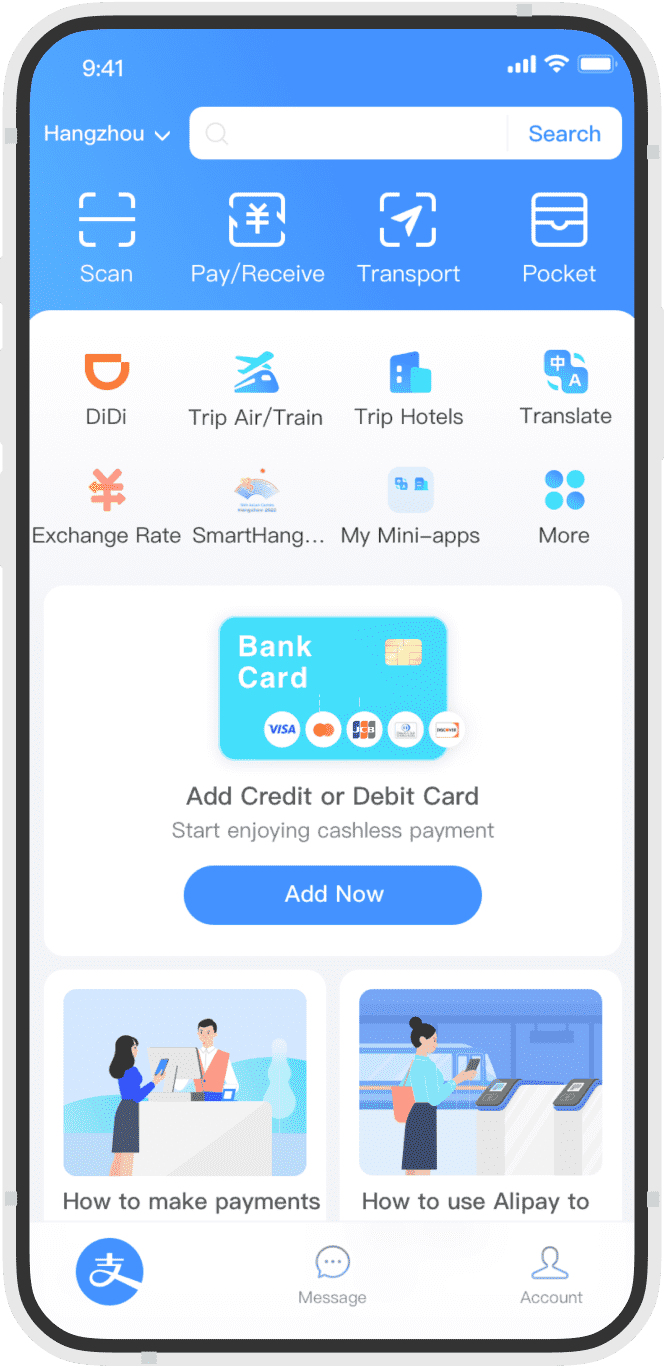
- Open Me / Account → Bank Cards → Add Bank Card. The Add Now prompt on the home screen leads to the same task if it appears.
- Type the card number or use Scan if offered. Enter the expiry date and security code. If asked for your name or billing address, use the details your issuer has on file. If asked for the issuing country, select the country where the card was issued.
- Read the terms and tap Agree to Terms and Add if shown. If your bank sends an approval by SMS or in its banking app, complete it. Return to Bank Cards and check that the card is listed with the correct last four digits.


Account sign-in, wallet identity checks and card approval are separate steps. With your card saved, you can make a small purchase once you arrive to check it works.
3. Where it works, limits and fees
- What it pays for. Use your linked card for eligible merchant purchases in mainland China, such as a coffee, a meal or groceries. The card pays directly and the wallet balance can stay empty. Personal transfers, red packets and similar wallet features aren’t available through a linked international card.
- What to check on a large bill. Shanghai’s visitor guide lists limits of up to US$5,000 per purchase and US$50,000 per year for linked overseas cards. Your account or issuer may set a lower limit. Check yours before relying on Alipay for a hotel deposit or large purchase.
- Platform fee. A single purchase of ¥200 or less is generally exempt. Above ¥200, a 3% fee can apply to the full amount. At that rate, a ¥300 purchase costs ¥309. Check the fee shown before you confirm.
- Currency conversion. The purchase is priced in yuan. Your card network and issuing bank determine the conversion for your statement, and your bank may charge its own foreign transaction fee.
4. How to pay at the counter
You scan the merchant’s QR code
- Open Alipay and tap Scan on the home screen.
- Point your camera at the shop’s code. If the amount is blank, enter the total in yuan.
- Check the shop name, amount and selected card. Confirm and show the success screen if the cashier asks.
The cashier scans your code
- On the home screen, tap Pay/Receive or Pay/Collect.
- Open the vendor payment code. Tap Activate Now if that option appears and follow the prompts.
- Check which card is selected. Hold the code up for the cashier’s scanner, then check the amount and status in Alipay.
If a QR code opens a transfer screen, ask for the shop’s merchant QR code. You can show the cashier 有商家收款码吗? (“Do you have a merchant QR code?”).
5. Common Alipay questions
- Why was my passport rejected?
- Compare your name, passport number, expiry date and issuing country with the document. Retake a blurry photo in even light. If Alipay asks for another page or a separate face check, complete that request in the app.
- What if Alipay says my account is restricted?
- Open the restriction notice and follow its instructions. If you can’t resolve it there, contact Alipay from Help Center or call +86 571 2688 6000 from an overseas number. Note the error text before closing it. If you have a payment in progress, check its status before using a backup.
- Do I need to top up or withdraw a wallet balance?
- For the linked-card method, leave the balance empty and pay from your card. If you need a refund, ask the merchant to refund the original purchase and track it in Alipay and your card statement.
- Why is the card saved but the payment declined?
- Check whether you scanned a merchant code, confirm the right card is selected and look for an approval request from your bank. If the app shows a failed payment, try another card, WeChat Pay or cash. If it says Pending, ask the shop whether it received the payment before trying again.
Set up WeChat Pay
1. Download WeChat and sign in
Install WeChat (微信) before departure. Weixin Pay is the payment wallet inside WeChat. Have your passport, a phone line that can receive texts and an eligible card in your name. Keep access to the phone number registered with your bank as well.

- If you already have WeChat, sign in and update the app. If you are new, choose Sign Up and follow the mobile-number registration prompts.
- Choose your country or region so the calling code matches your SIM. Enter the overseas number you will still be able to access in China. You can keep that line on for texts while a separate eSIM provides data.
- Complete the security check and enter the SMS code when requested. If WeChat asks for registration assistance, follow the process shown in the app. Once you reach your Chats or Me tab, you can start setting up payments.
2. Open the wallet, verify your ID and add a card
Find the wallet
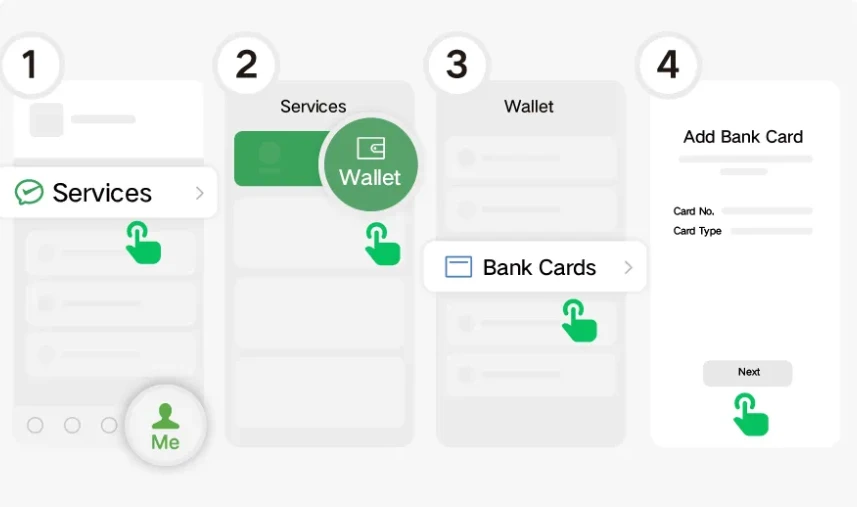
- Tap the bottom-right Me tab. Open Services, then Wallet.
- If Services is missing, try Me → Settings → General → Tools → Weixin Pay → Enable if these options appear. Return to Me and check for Services again.
- If the route still differs, update WeChat and open Tencent’s visitor help page. The Shanghai visitor guide also shows an official card-linking QR you can scan from + at the top right. Use it only from the official page.
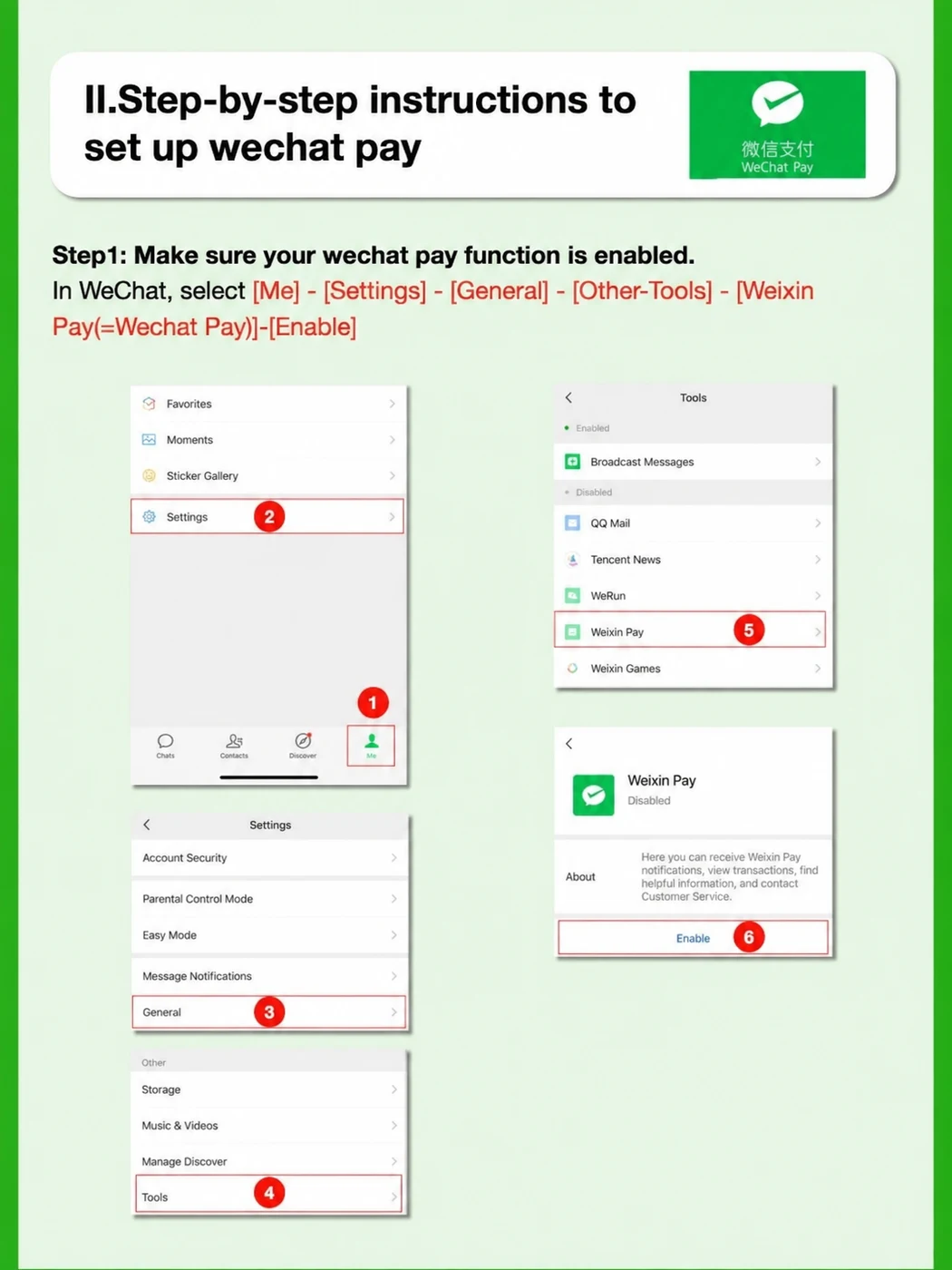
Complete the identity check as prompted
Some accounts can add an overseas card with basic information first. If you see Verify Now or a request for identity information inside the wallet, open it, choose your passport as the document if offered and follow the app’s instructions. Use your name and passport details as printed. If a passport photo is requested, capture the full photo page clearly. Check the screen for any remaining steps before relying on the wallet.
Bind your international card
- Tap Bank Cards → Add a Bank Card from Wallet. Enter the number or use another entry option if offered.
- Check the cardholder name, expiry and security code. Enter the billing address if requested using the information held by your issuer. Read the Weixin Pay agreement and confirm.
- If asked to verify the number on file with your bank, check that line or the banking app for the alert. A bank code approves the card and is separate from the WeChat sign-in code. Set a payment password if the wallet prompts you to.
- Return to Bank Cards and match the last four digits to the card you added. The practical test is a small purchase at a staffed shop after arrival.
3. Where it works and what it costs
Use the linked card for eligible merchant purchases in mainland China. Weixin Pay can charge the card directly without topping up the wallet. Personal transfers and red packets fall outside the ordinary international-card purchase flow.
Tencent lists international Visa, Mastercard, JCB, American Express and Discover Global Network cards including Diners Club, among others. The app and issuer determine whether your specific card is eligible. Shanghai’s visitor guide lists maximums of US$5,000 per payment and US$50,000 per year for linked overseas cards. Check the limit shown for your account.
Payments of ¥200 or less are generally exempt from the platform fee. Above ¥200, the platform may charge 3% of the full amount. Check the checkout total and any eligible waiver, then check your card agreement for issuer fees. A ¥300 purchase with a 3% platform fee would show ¥309 before any separate issuer charge.
Shanghai’s official guide to international card fees and limits
4. Make your first payment at a staffed shop
When the shop displays a QR code
- In WeChat, tap + at the top right and select Scan.
- Scan the merchant sign. Check the shop name and enter the yuan amount if the screen asks you to.
- Choose your linked card if there is a choice. Review the total, any fee and the selected card, then confirm and wait for the result.
When the shop scans your phone
- From the main WeChat screen open + and Money if shown. Some versions put the payment option in Me → Services.
- Open your payment code and choose your linked card if prompted. Hold it toward the cashier’s reader and check the receipt amount in the app once the payment is complete.
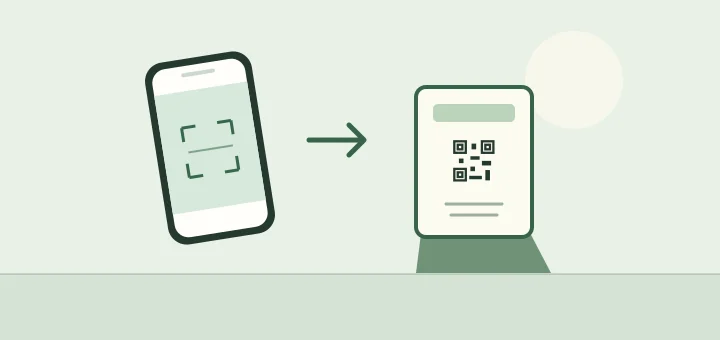
If a QR takes you to a personal transfer screen, ask for a merchant code. See the two checkout pictures to tell which direction the scan goes.
5. Fix common WeChat Pay problems
- The wallet asks for a different text code
- During sign-up, check the number you typed into WeChat. During card verification, check the number your bank has on file and look for an approval in its app.
- The card is there but it won’t pay
- Check the selected card and whether the QR is for a merchant purchase. If your app confirms the attempt failed, use a different card, Alipay or cash. Ask your issuer about any card block.
- A payment still shows as pending
- Ask the cashier to check their side and open the transaction in your wallet. Wait for the outcome before paying again. Keep the transaction reference if you need help.
- I can’t find the wallet or sign in
- If you’re signed in, try the enabling steps above. For sign-in or payment issues, use Tencent’s official Weixin Pay support. Use a different payment method for the immediate purchase.
Tencent’s explanation of overseas numbers and identity checks · Official guide to enabling Weixin Pay
Make your first payment at a shop
Try buying a bottle of water or a coffee at a staffed shop when you arrive. Look at the counter first. When the cashier points to a payment sign, you scan it. When they pick up a scanner, open your own payment code.
You scan the shop’s code
Alipay · Tap Scan on the home screen.
WeChat · Tap + at the top right, then Scan.
Point your camera at the merchant’s QR. Enter the total in yuan if the code doesn’t fill it in. Check the merchant name and amount, then confirm with your linked card. It pays from the card directly, so you can leave the wallet balance empty.
The cashier scans your code
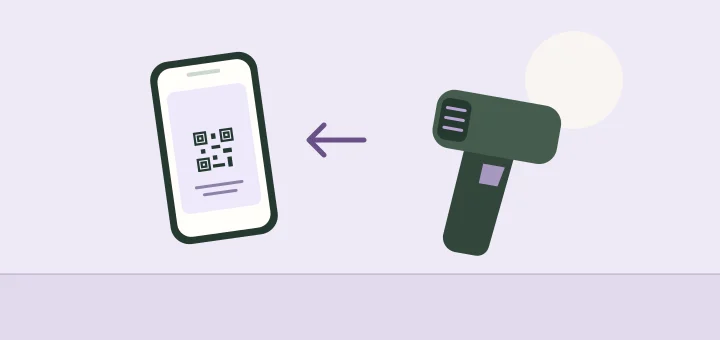
Alipay · Open the payment code from the home screen, often under Pay/Collect or Pay/Receive.
WeChat · Try + → Money from the main screen. Some versions show it under Me → Services → Money.
Select the card you want to use if prompted. Hold the code up for the cashier and confirm the receipt amount in the app.
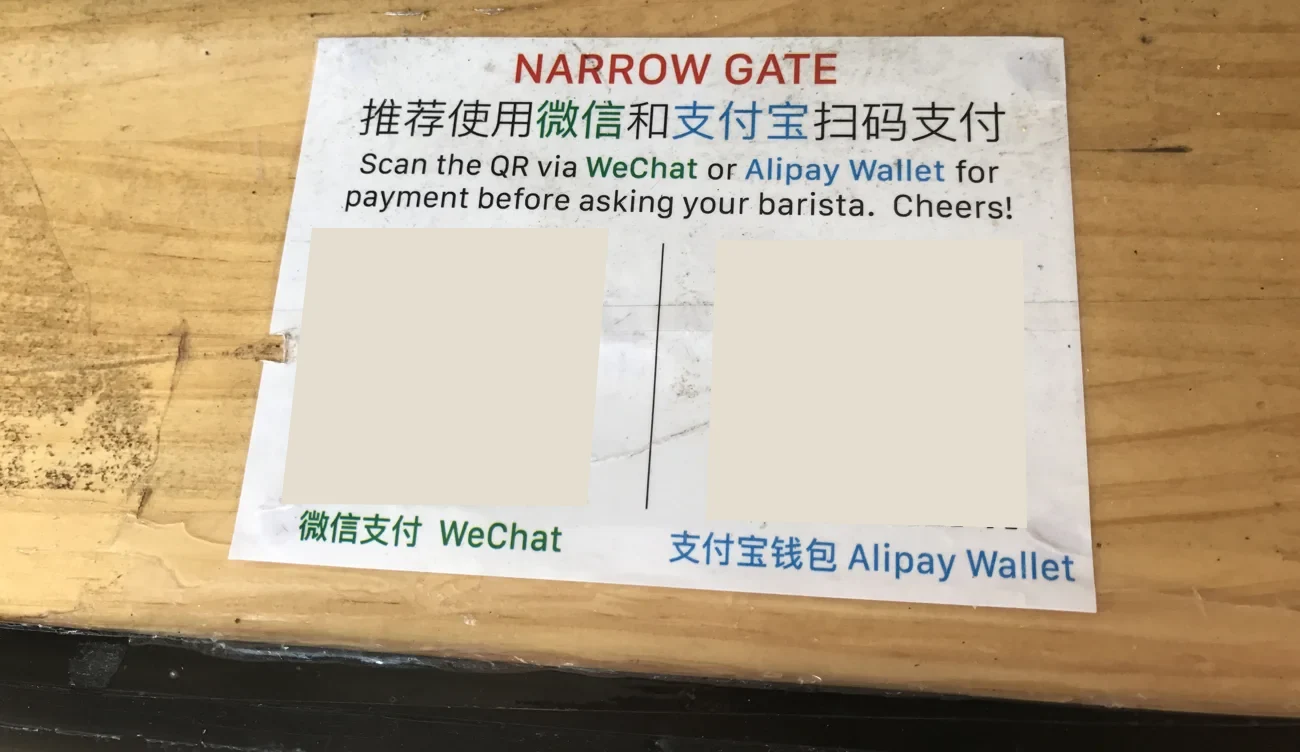

If the app opens a personal-transfer screen, ask for the shop’s merchant code. Linked international cards are for eligible purchases and are generally unavailable for personal transfers or red packets. You can show the cashier 有商家收款码吗? (“Do you have a merchant QR code?”) or 可以用现金吗? (“Can I pay in cash?”).
Check the fee before you confirm
For an overseas card linked to either wallet, a purchase of ¥200 or less is generally exempt from the platform service fee. Over ¥200, a 3% fee may apply to the whole purchase. A ¥300 bill would carry a ¥9 platform fee at that rate, for a ¥309 total. Check the fee and any exemption on the confirmation page. Your card issuer may also charge a separate foreign transaction fee.
If setup or payment fails
- The sign-up code never arrives
- Check the country code and the number you entered. Make sure your usual SIM is active and can receive texts. If the message is from your bank, check the number on file there and look for a pending approval in its app.
- The wallet rejects your passport
- Check the document type and enter your name and passport details as printed. If a photo is required, use even light, keep all edges in frame and follow any extra prompts in your account. If it still fails, contact the wallet using its official help.
- Your card won’t link or is declined
- Check the expiry and billing details, and look for an issuer approval request. Ask your bank whether it blocked the transaction or requires you to enable international purchases. If you’re at the counter, check the payment status first, then switch to a different card, wallet or cash if the payment failed.
- The payment shows “Pending”
- Open the transaction in the wallet and ask the cashier to check whether it arrived. Wait for the status to resolve before paying again or switching wallets. Keep the transaction reference if you need help.
For a cash backup, carry smaller notes and look for your card network logo on an ATM. For a direct card payment, ask the cashier whether their terminal accepts your network. In Shanghai, the arrival service centers at Pudong terminals 1 and 2 and Hongqiao terminal 1 can help with local payments.
Check that your first payment went through
- Before you leave for China Sign in successfully and confirm the intended bank card appears in the wallet with the right last four digits. Keep access to your bank’s verification method.
- At the shop Make one small purchase. Check the transaction in the wallet for a successful result and match the amount and merchant with the cashier.
If you get stuck. If the wallet says Pending, ask the cashier to check the transaction and wait for the status to resolve. If it clearly failed, try a second card, the other wallet or RMB cash.
Sources
- Ant International · Alipay setup and screenshots
- Alipay · international card service and identity verification
- Alipay Help Center · where to find Identity Information
- Frankfurt Chamber of Commerce · identity, card and checkout screens
- Tencent · Weixin Pay for international visitors
- Tenpay · Weixin Pay international-card terms
- Shanghai municipal government · wallet menus and screenshots
- Shanghai municipal government · fees, foreign cards and ATMs
- Guangzhou · overseas phone numbers and enabling Weixin Pay
- China Ministry of Commerce · visitor payment guide
Keep planning
- Internet & eSIMChina eSIM, local SIM or roaming?Check if your phone supports a China travel eSIM, install it on iPhone or Android and keep your home number available for bank texts.
- Itineraries10 days in China: Beijing, Suzhou and ShanghaiA 10-day first trip with four nights in Beijing, five in Shanghai and one Suzhou day trip. Each day has a route and a fallback.